Product / Analyze & Compare
See the Full Capital Structure in One Table
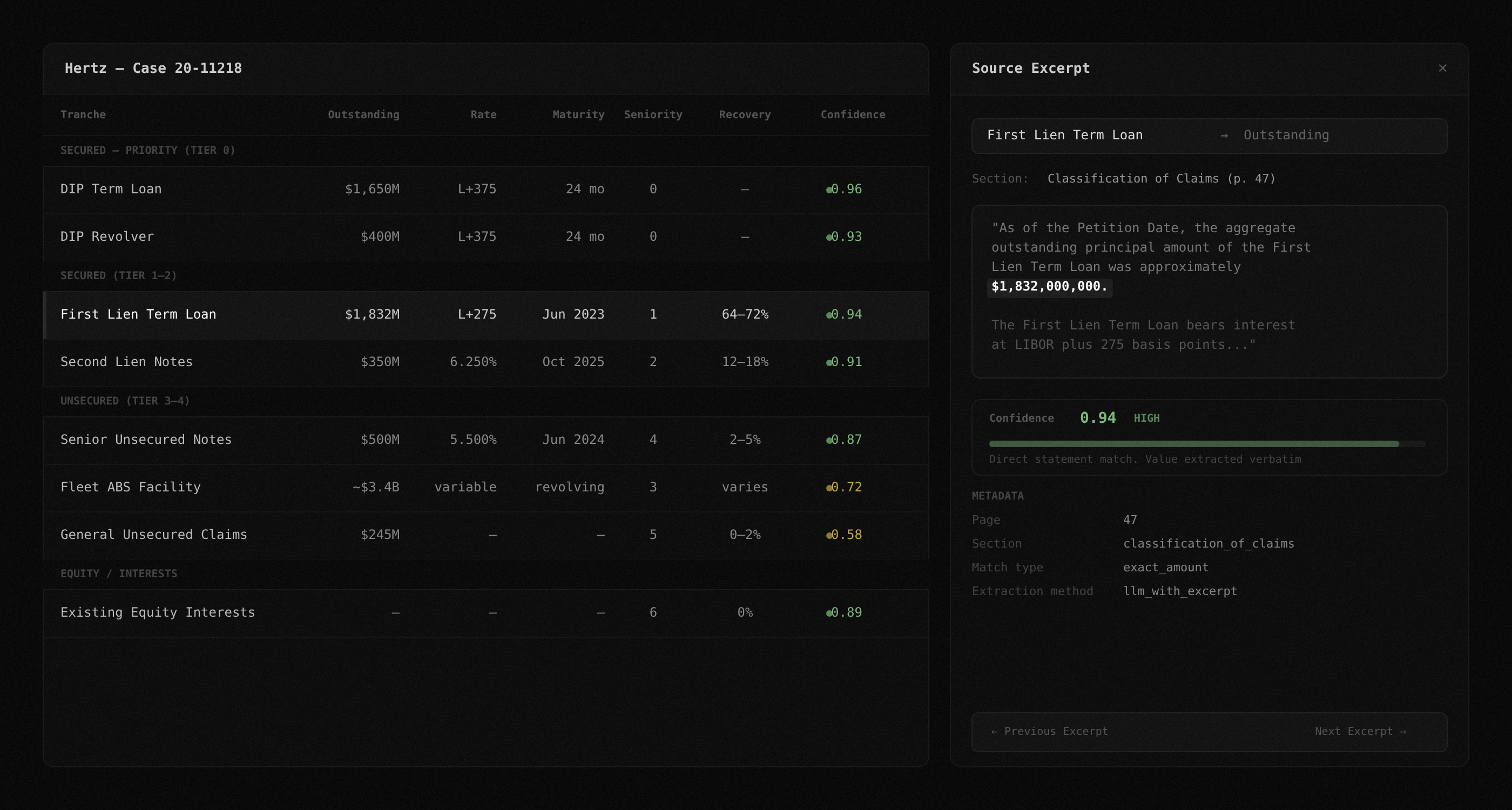
Every tranche, every confidence score, every source excerpt. Sort by seniority, filter by type, compare across plan amendments. Click any value to see exactly where it came from in the filing.
Manual Capital Structure Analysis Is Error-Prone and Slow
When a 297-page filing mentions the same tranche under three different names across six plan amendments, spreadsheets and ctrl+F are not enough. You need structure, provenance, and version tracking.
Problem: Spreadsheets and PDFs
- Analyst builds a cap table by hand from a 297-page filing
- Same tranche appears as 'First Lien Notes,' 'Existing First Lien Facility,' and 'Prepetition First Lien Credit Agreement' across sections
- Recovery estimate changes between plan amendments with no clear flag
- No link between the number in the spreadsheet and the sentence in the filing
- One wrong number, presented confidently, misinforms the entire trade
Solution: Structured Table with Provenance
- Every tranche extracted with face amount, rate, maturity, seniority, and recovery estimate
- Fuzzy deduplication resolves naming variants into one clean entry
- Diff engine shows exactly what changed between plan versions
- Every value links to the raw text excerpt that produced it
- Confidence scores flag ambiguous or range-based values before they become mistakes
How TrancheLab Analyze Works
Step 1:
Structured tranche table
Every extracted tranche appears in a sortable, filterable data grid. Columns include tranche name, outstanding balance, interest rate, maturity date, seniority ranking, recovery estimate, and confidence score. Group by seniority tier to see the full capital structure hierarchy at a glance.
Docs: Tranche Table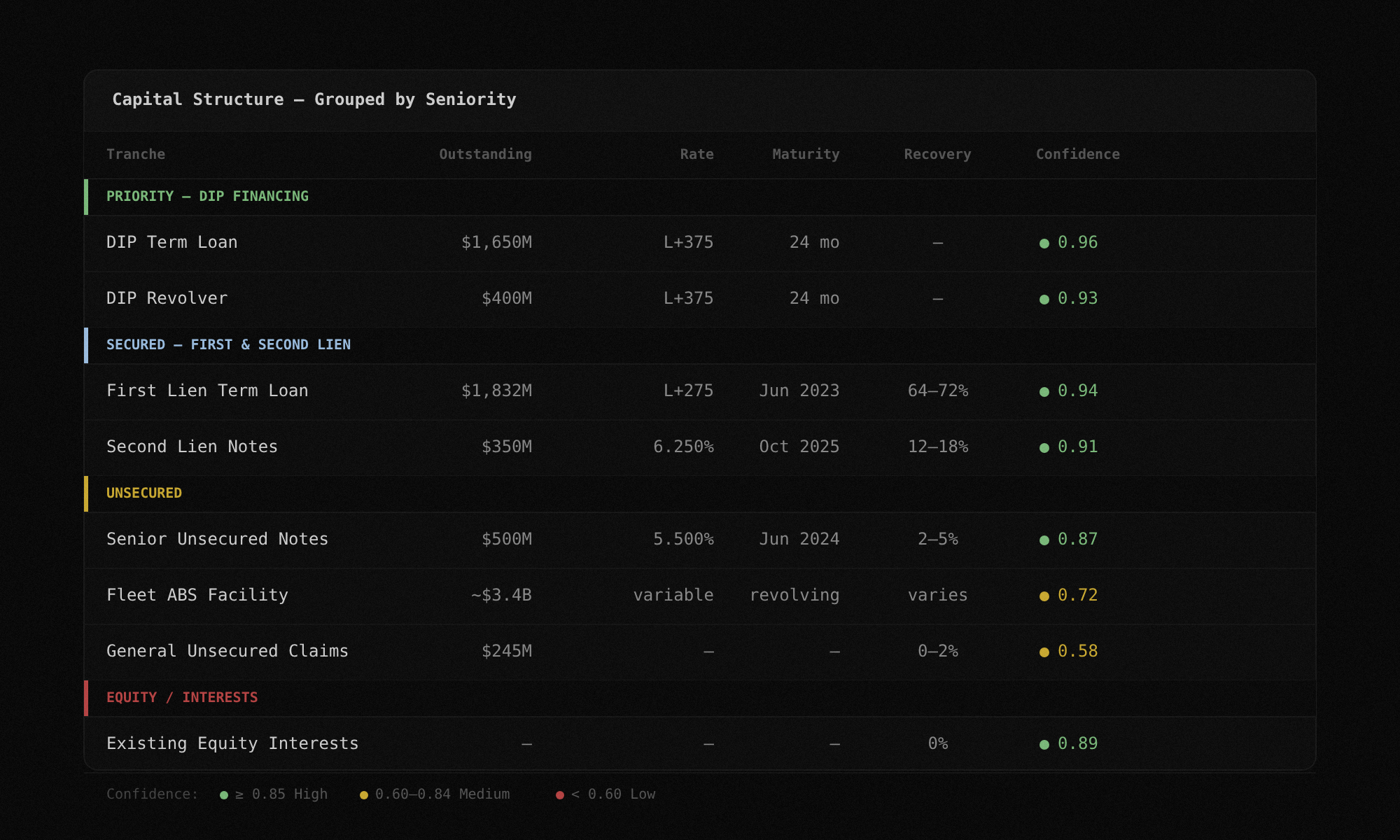
Step 2:
Click any value, see the source
Every extracted number links back to the exact sentence in the filing that produced it. Click any cell in the tranche table and a side panel opens with the raw text excerpt, the page number, and the section it came from. No black boxes. If you do not trust a value, you can verify it in two seconds.
Docs: Source Excerpts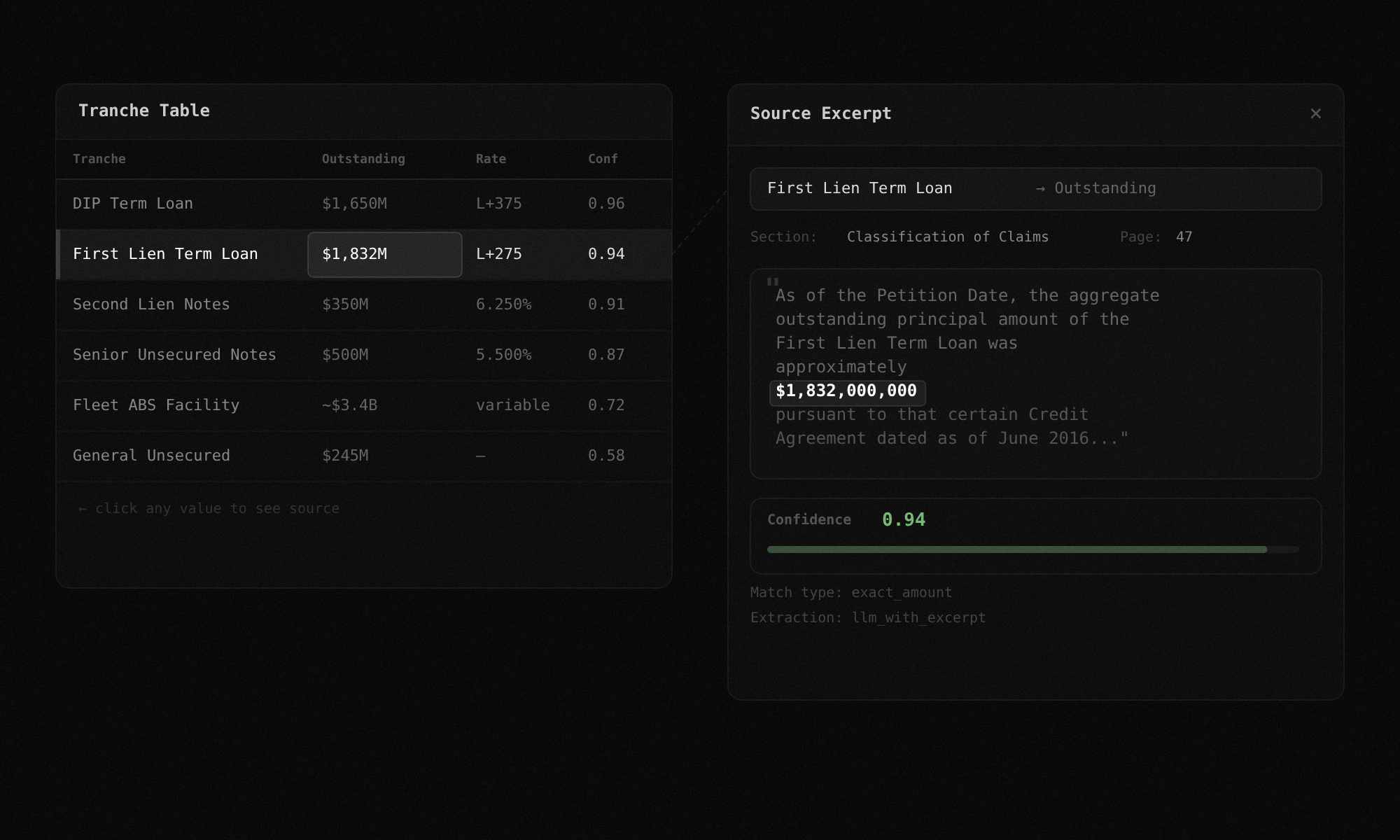
Step 3:
Confidence scoring on every field
Every extracted value gets a confidence score from 0.0 to 1.0 based on how cleanly it matched to source text. A score of 0.94 means a near-exact match to a specific sentence. A score of 0.72 means the value came from a range, an approximation, or a cross-reference that required inference. A score of 0 means no supporting excerpt was found. The score is deterministic, not a model probability. It measures extraction quality, not how likely the number is to be correct.
Docs: Confidence Calibration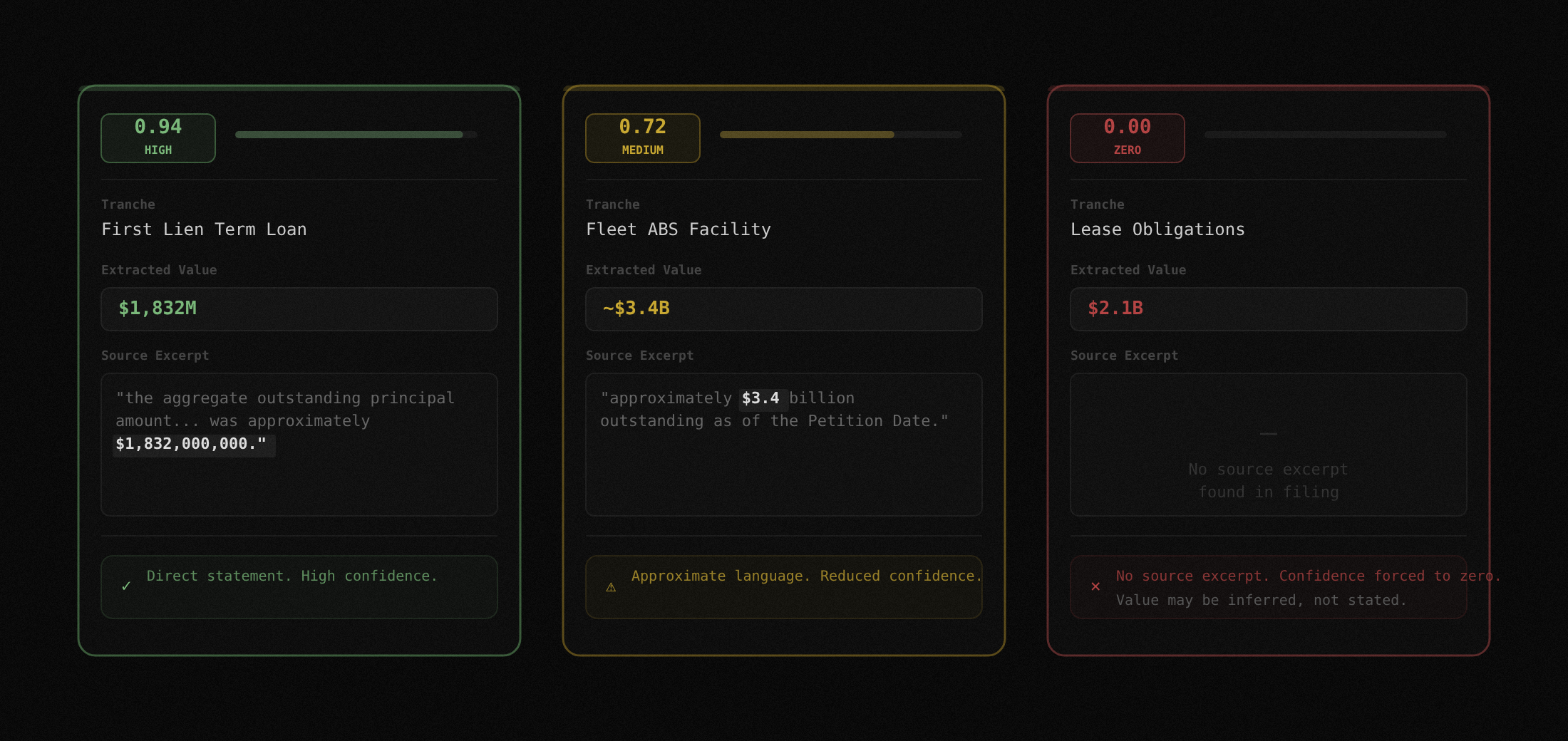
Step 4:
Compare across plan amendments
Upload two versions of a plan or disclosure statement. The diff engine extracts both, matches tranches across versions, and shows a side-by-side comparison of every value that changed. New tranches, removed tranches, and modified values are all flagged. When a debtor files six plan amendments in two months, this is how you track what moved.
Docs: Diff Engine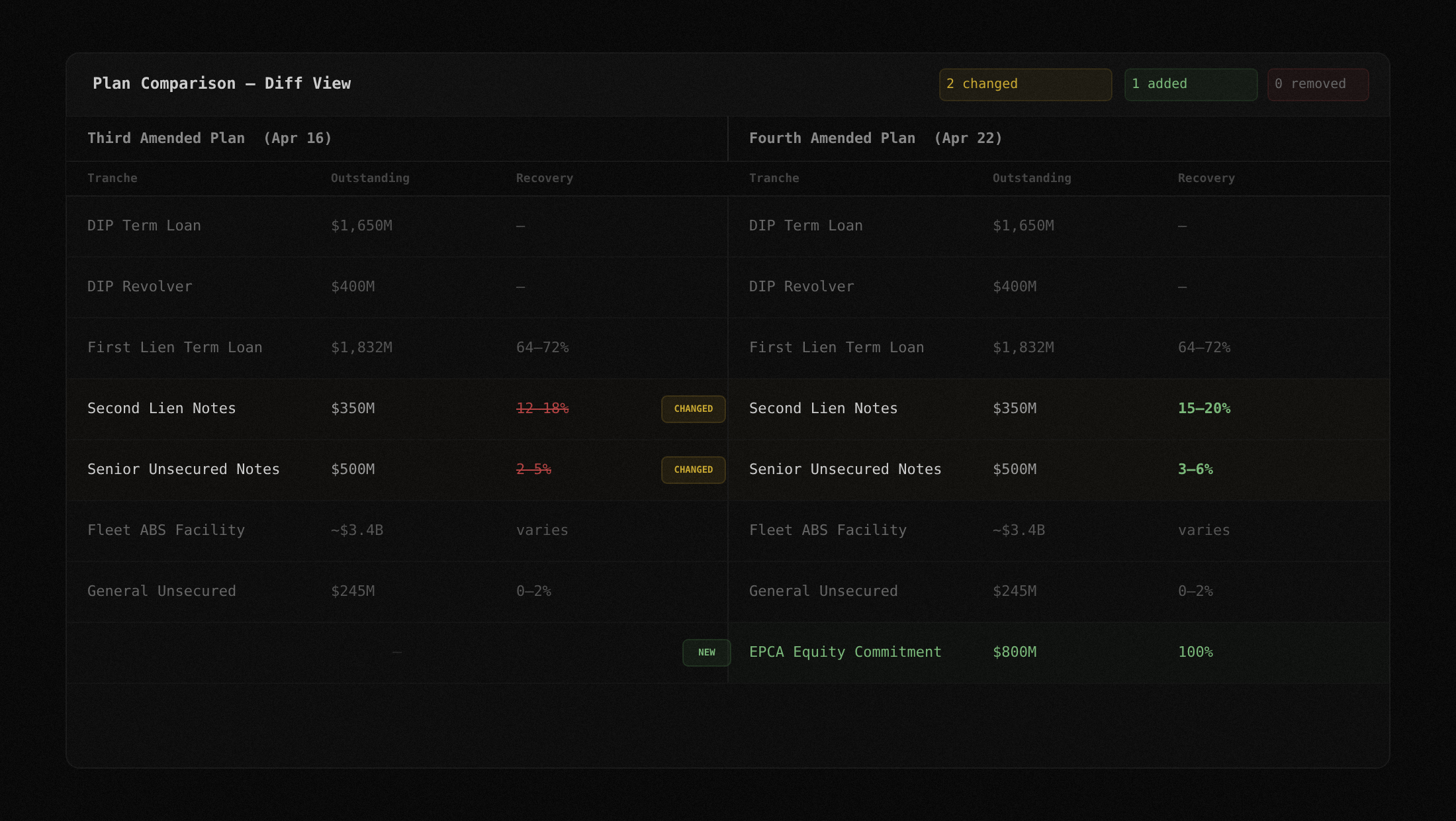
Step 5:
Filter, group, and export
Sort by any column. Filter by tranche type or seniority tier. Group by seniority to see the full waterfall. Export the filtered view as JSON or CSV. The table is not a static report. It is a working surface you can manipulate and take with you.
Docs: Export Formats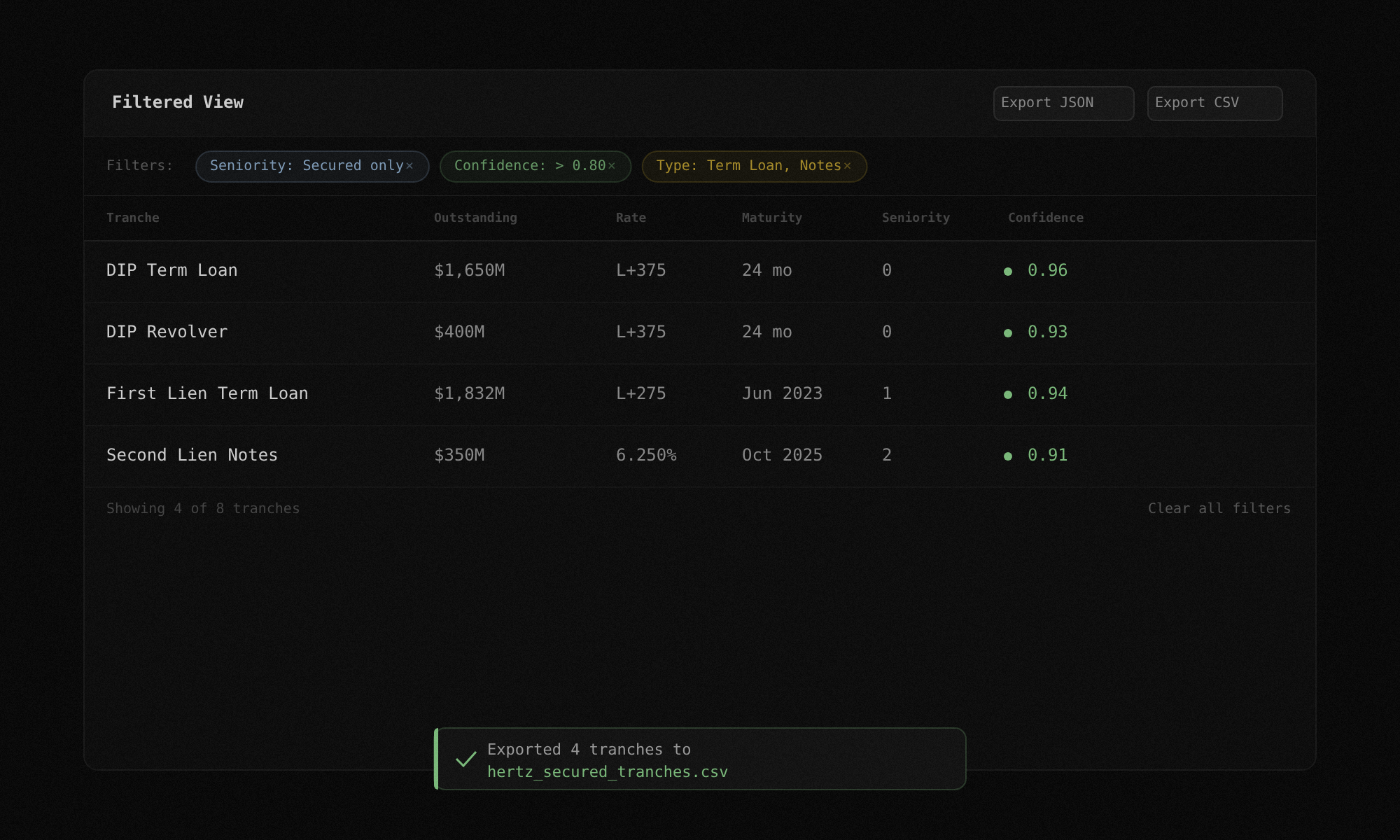
Built for restructuring analysis
The tranche table is the starting point. These features are designed for how analysts actually work through a filing.
Seniority grouping
Group tranches by their position in the capital structure. See secured, unsecured, and administrative claims separated with clear tier boundaries. Understand the waterfall without building it yourself.
Source verification
Every number traces back to its origin. Click any value to see the page number, section name, and raw text excerpt. Audit the extraction without opening the PDF.
Amendment tracking
When the debtors file six plan versions in two months, the diff engine tracks what changed. Recovery estimates, tranche definitions, new DIP facilities. Side-by-side, version to version.
Filtered exports
Apply filters, then export only what you need. A CSV of secured tranches with confidence above 0.80. A JSON payload of all tranches with their source excerpts. The output fits your workflow, not the other way around.
FAQ
Every debt tranche extracted from the filing: name, outstanding balance, interest rate, maturity date, seniority ranking, recovery estimate where disclosed, and a confidence score. You can sort, filter, and group by any column.
Click any value in the table. A side panel opens showing the exact sentence from the filing that produced that value, along with the page number and section name. If no supporting text was found, the confidence score is 0 and the excerpt panel says so.
Yes. The diff engine works on any two PDFs. You can compare a disclosure statement against a plan of reorganization, or two entirely different cases. The matching is tranche-name-based with fuzzy matching, so it handles slight naming differences.
JSON and CSV. Both include all extracted fields, confidence scores, and source excerpt references. The export reflects whatever filters you have active in the table.
It organizes the tranche table into collapsible sections: DIP and administrative claims at the top, then secured tranches by lien priority, then unsecured, then equity interests. This gives you the capital structure waterfall in one view without building it manually.
Not yet. Export is the current mechanism for sharing. Saved views and shareable links are on the roadmap.
Stop Building Cap Tables by Hand
See how TrancheLab turns a filing into a structured, sortable, verifiable capital table in minutes.
Book a Demo